
CSV import
bring your own reviews along.
Moving from another review plugin or shop platform? Import the reviews your own customers wrote for your shop from a CSV file. You see a preview with every row checked before anything is saved.
01Only your own reviews
Import only reviews your customers wrote for your shop. Do not import reviews copied from marketplaces such as AliExpress or Amazon, or from other sellers. Showing them as your own misleads your customers and breaks consumer protection rules in many countries. Reviewmend has no tool for that and never will.
02The CSV format
One header row, then one review per row. Columns can be in any order. The separator can be a comma, a semicolon or a tab; Reviewmend detects it from the header row. Save the file as UTF-8 (a BOM is fine).
| Column | Also accepted as | Value | |
|---|---|---|---|
product | product_id, sku, product_sku, product_id_or_sku | Product ID or SKU. A variation ID or SKU is saved on its parent product. | Required |
rating | stars, score | Whole number 1 to 5. | Required |
text | review, content, review_text, comment | Review text. May be empty. Longer than 5,000 characters is shortened, with a warning. | Column required |
author_name | author, name, reviewer, reviewer_name | Name shown on the review. Must not be empty. | Required |
author_email | email, e_mail, reviewer_email | Valid e-mail address, or empty. | Column required |
date | review_date, created, created_at, date_created | YYYY-MM-DD or YYYY-MM-DD HH:MM, read in your shop time zone. Not in the future, not before 1995. | Required |
verified | verified_buyer, verified_owner | yes/no (also y, 1, true, verified / n, 0, false, empty). Anything else imports as not verified, with a warning. | Column required |
photos | photo_urls, photo_url, images, image_urls | http or https links separated by |. Up to 6 per review. | Optional |
Header names ignore upper/lower case, and spaces or dashes count as underscores ("Author Name" works). If a required column is missing, the upload is refused and the notice names the missing columns.
03Sample file
Use your own product IDs or SKUs. The Tools page also has a Download an example file link with the same columns.
product,rating,text,author_name,author_email,date,verified,photos
LINEN-SHIRT-M,5,"Fits perfectly, I wear it every week.",Anna K.,anna@example.com,2025-03-14,yes,
MUG-STONE-01,4,"Good quality, the colour is a bit darker than on the photo.",Tom B.,tom@example.com,2025-04-02 09:30,no,https://example.com/photos/mug-1.jpg|https://example.com/photos/mug-2.jpg
158,3,"Okay for the price.",Lena M.,,2025-05-20,yes,
Text with commas goes in double quotes. In this sample the first two rows use SKUs and the third a product ID with no e-mail address.
04Import step by step
- UploadReviewmend → Tools → Import reviews from a CSV file → choose the file → Upload and preview. Limit: 5 MB (or your server's lower upload limit) and 20,000 rows per file. Split bigger files.
- Check the previewThe first 20 rows are shown, each with a badge: Ready, Imported with a warning, Already imported or Skipped (with the reason). The line above the table counts all rows with errors.
- Choose publishingPublish the imported reviews right away is ticked by default. Untick it to hold them for moderation under Products → Reviews.
- ImportPress Import N reviews. Small files (up to 100 rows and 10 photos) are imported at once. Bigger ones run in the background in batches of 50; the page shows progress and refreshes by itself, and you can leave it.
- Read the reportRows read, reviews imported, photos imported, already imported, rows with errors and warnings, with up to 200 detail lines. Import another file starts over.
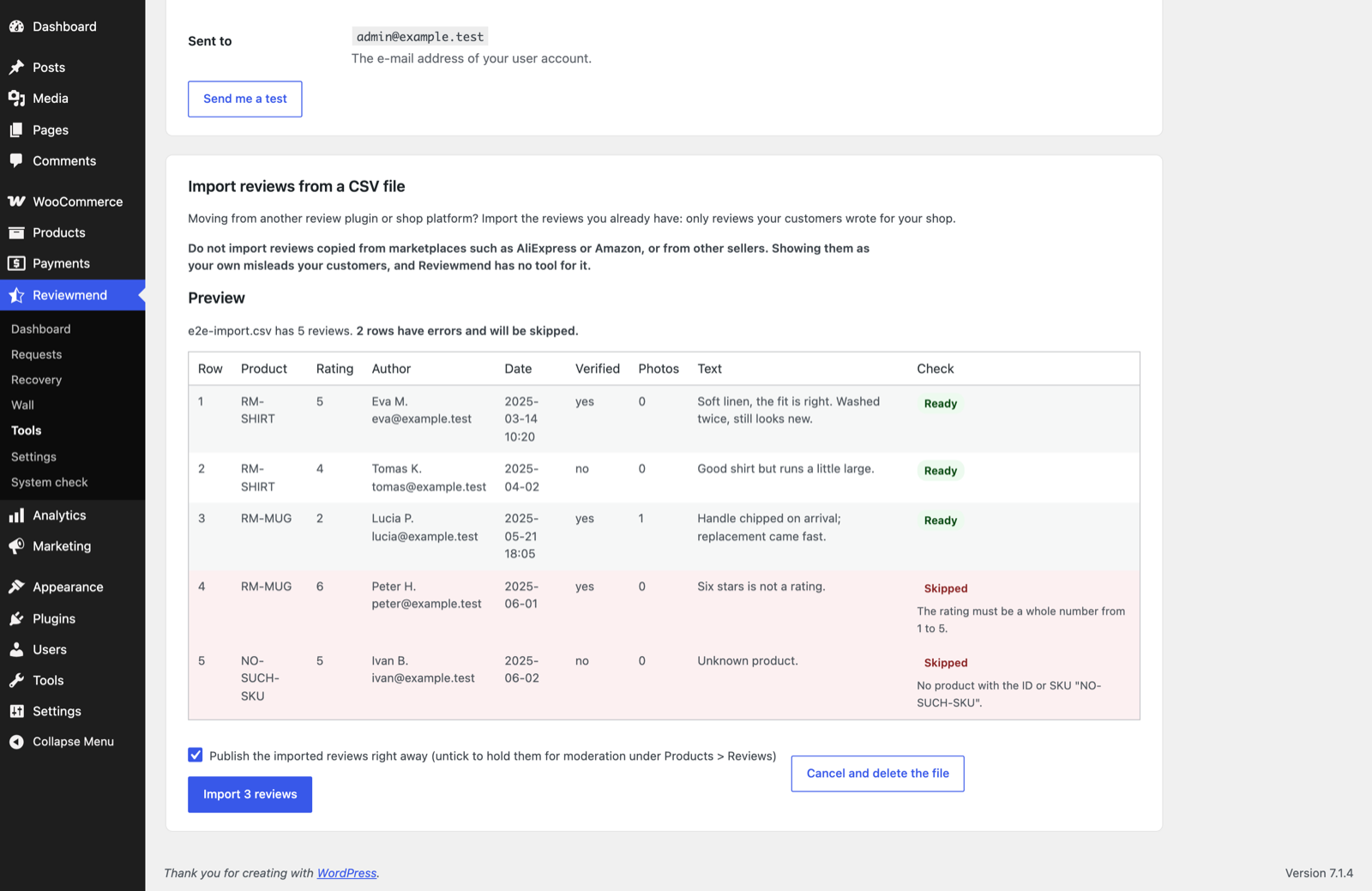
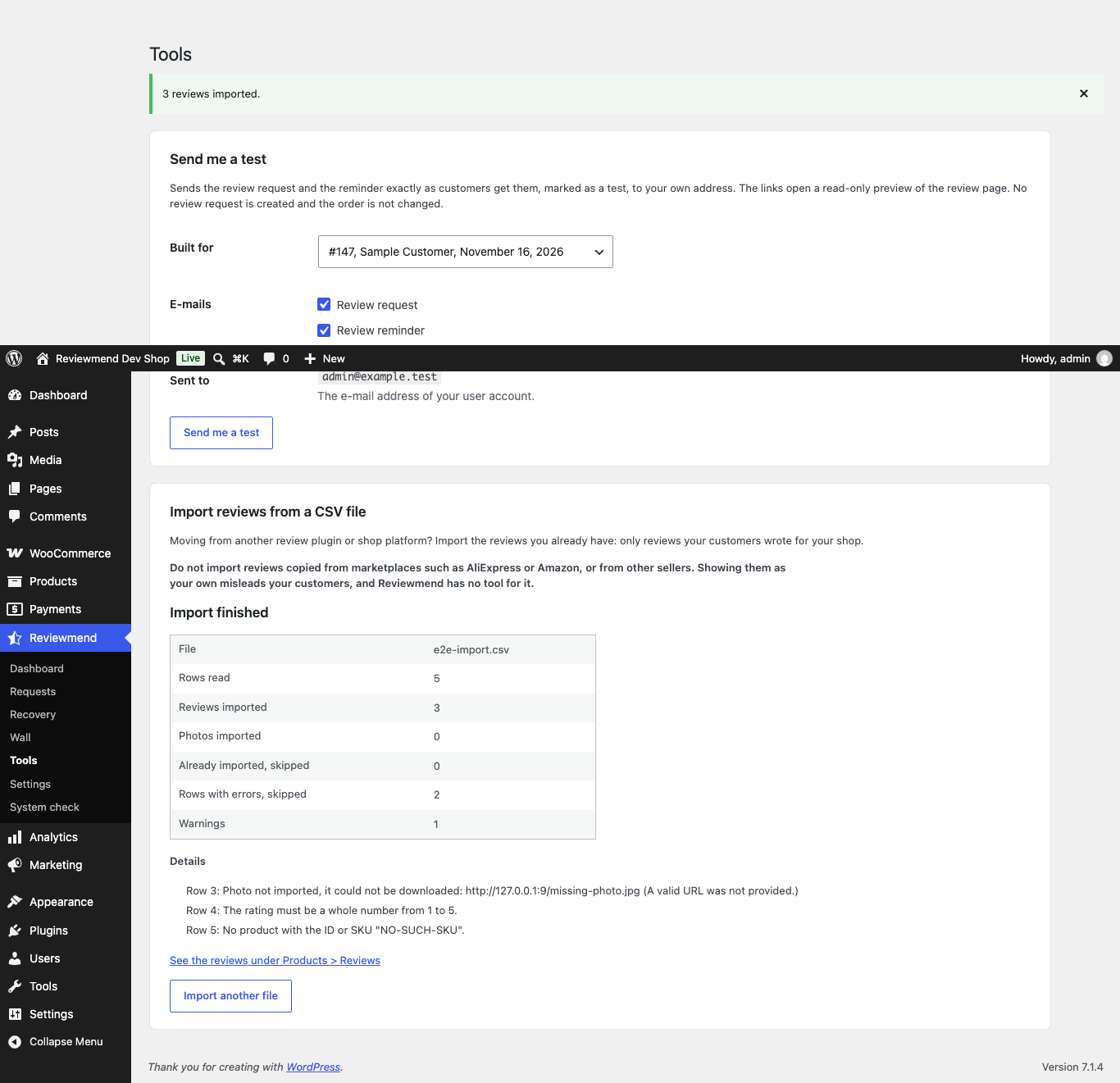
Cancel and delete the file (in the preview) or Stop the import (while running) deletes the uploaded file. Reviews imported so far stay.
05What an imported review is
- A native WooCommerce product review with its original date, rating and the
verifiedflag from your file. - Marked internally with the comment meta
reviewmend_imported. It is not labelled on the product page. - It never opens a recovery case, never gets a coupon and is not counted on the dashboard.
- A row with the same product, date, e-mail and text as an existing review is skipped as "Already imported", so importing the same file twice is safe.
- Photos are downloaded (15-second timeout each), checked as JPG, PNG or WebP within your photo size limit and stored like customer photos. A photo that fails gives a warning; the review is still imported.
06Where the file is kept
Only one import runs at a time. The uploaded file is stored under wp-content/uploads/reviewmend-import/ with a random name, next to a deny-all .htaccess and an empty index.php, and is deleted when the import ends or is cancelled. On nginx, .htaccess has no effect; add the rule in nginx and the import folder.