
Installation
and the System check.
Install the plugin ZIP, see what activation creates, and read the System check row by row.
01What is in the download
The file you download from CodeCanyon contains reviewmend.zip, the installable plugin, and this documentation. Inside reviewmend.zip is one folder, reviewmend/, with the full, readable PHP source.
| Path inside the plugin | What it is |
|---|---|
reviewmend.php | Main plugin file (version, requirements). |
includes/ | All PHP classes, namespace Reviewmend. |
templates/emails/ | The four e-mail templates, HTML and plain text (overrides). |
assets/ | CSS and two small scripts (product page lightbox, import progress). |
blocks/wall/ | The Review wall block. |
languages/reviewmend.pot | Translation template. |
uninstall.php | Runs only when you delete the plugin (Uninstall). |
02Install the plugin
- Activate WooCommerce firstReviewmend declares WooCommerce as a required plugin, so WordPress will not activate it without WooCommerce.
- UploadWordPress admin → Plugins → Add New Plugin → Upload Plugin. Choose
reviewmend.zipand press Install Now. - ActivatePress Activate Plugin. The Reviewmend menu appears below WooCommerce and Products.
- Open the System checkReviewmend → System check, then fix any Problem row.
With WP-CLI:
wp plugin install reviewmend.zip --activateWordPress shows this when the ZIP is larger than your upload limit. reviewmend.zip is about 190 KB, so this usually means you picked the whole CodeCanyon download instead. Upload reviewmend.zip only.
03What activation creates
- Four database tables:
{prefix}reviewmend_invites(review requests),reviewmend_cases,reviewmend_case_events(case history) andreviewmend_unsubscribes. - The settings in one option,
reviewmend_settings, with the defaults from Settings. - A signing key (
reviewmend_secret, random, 64 characters) that signs every review link. Never share it. - A published page called Review your order at
/review-your-order/containing the[reviewmend_review]shortcode. Reviewmend hides it from page lists and menus generated by WordPress, and search engines are told not to index it. - A capability,
reviewmend_manage_cases, given to the Administrator and Shop manager roles. It controls access to the recovery desk.
Deactivating stops the background tasks. It never deletes data.
05The System check, row by row
The top line tells you the result: "Everything Reviewmend needs is in place", "Review requests work. N warnings are worth a look", or "N problems stop review requests from working. Fix them first." Each row has a status: OK Note Warning Problem.
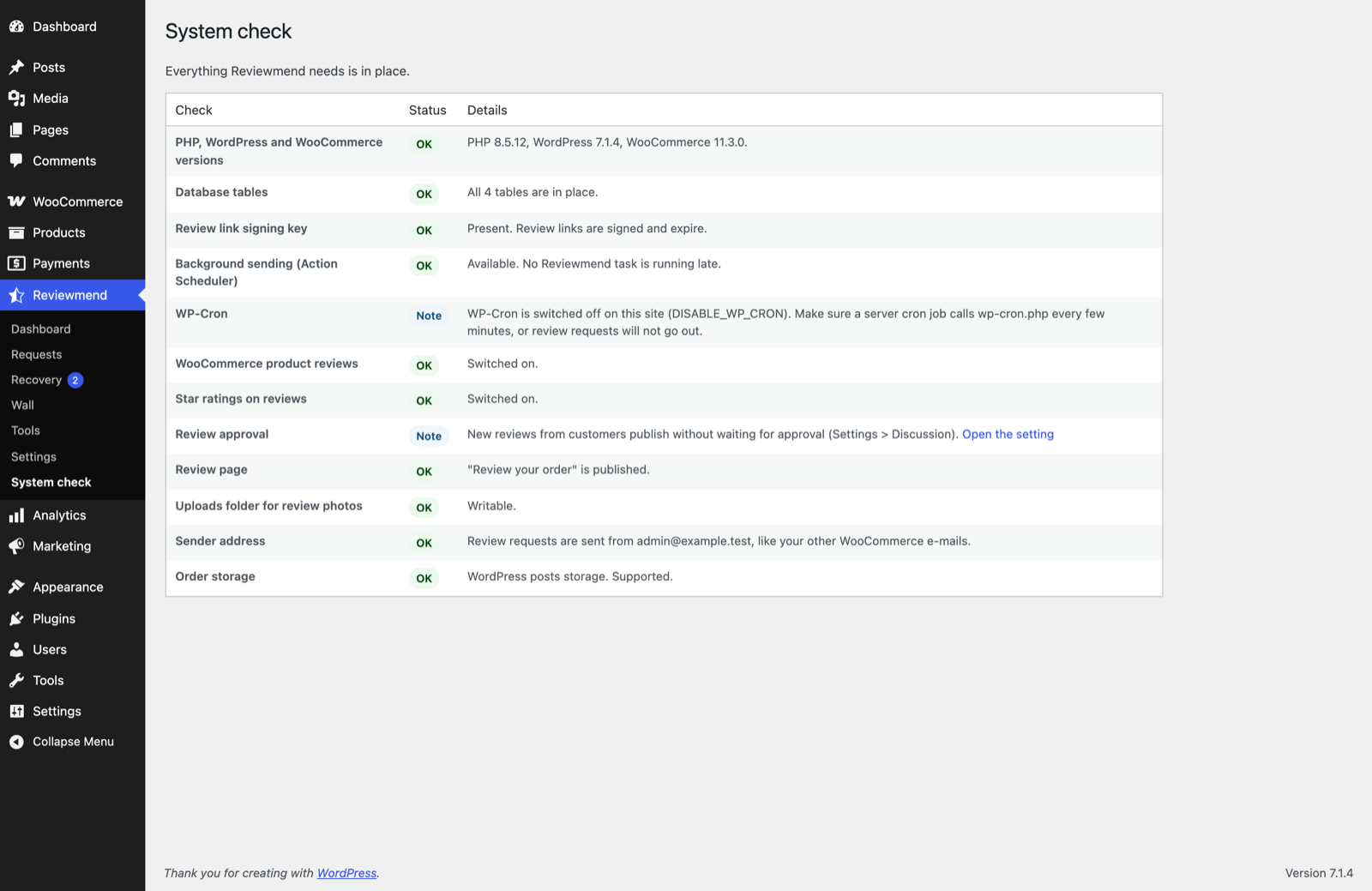
| Row | What it checks | How to fix it |
|---|---|---|
| PHP, WordPress and WooCommerce versions | WordPress 7.0+ and WooCommerce 10.0+. Shows your PHP, WordPress and WooCommerce versions. | Update WordPress or WooCommerce. |
| Database tables | All four tables exist. | Deactivate and activate Reviewmend; activation creates missing tables. |
| Review link signing key | The key that signs review links exists. | Deactivate and activate Reviewmend. |
| Background sending (Action Scheduler) | Action Scheduler is available and no Reviewmend task is more than an hour late. | If tasks are late, WP-Cron is not running. See Cron not running. The link opens WooCommerce → Status → Scheduled Actions filtered to Reviewmend. |
| WP-Cron | Whether DISABLE_WP_CRON is set. Always a Note. | If it is set, make sure a server cron job calls wp-cron.php every few minutes (Going live → Cron). |
| WooCommerce product reviews | "Enable product reviews" is on. | Open the setting and tick it. A Problem: without it no request goes out. |
| Star ratings on reviews | "Enable star rating on reviews" is on. | A Warning: ratings are saved but the shop does not display them. |
| Review approval | Whether Settings → Discussion holds new comments for approval. Always a Note. | Your choice. See Reviews held for approval. |
| Review page | The Review your order page exists, is published and still contains [reviewmend_review]. | Deactivate and activate Reviewmend to recreate a deleted page, or add the shortcode back to the page. |
| Uploads folder for review photos | WordPress can write to wp-content/uploads. | Ask your host to make the folder writable. A Warning: customers cannot attach photos until it is. |
| Sender address | WooCommerce has a valid "From" address. | WooCommerce → Settings → Emails → "From" address. |
| Order storage | Which order storage WooCommerce uses. Both are supported. | Nothing to do. |
The System check does not check PHP itself: WordPress already refuses to activate the plugin on PHP older than 8.2.
06Next
Go through Settings, then send yourself a test.