
Dashboard
reports and CSV export.
See requests, ratings and the reasons behind them for the last 30, 90 or 365 days, export CSV files, and get a summary by e-mail every month.
01The dashboard
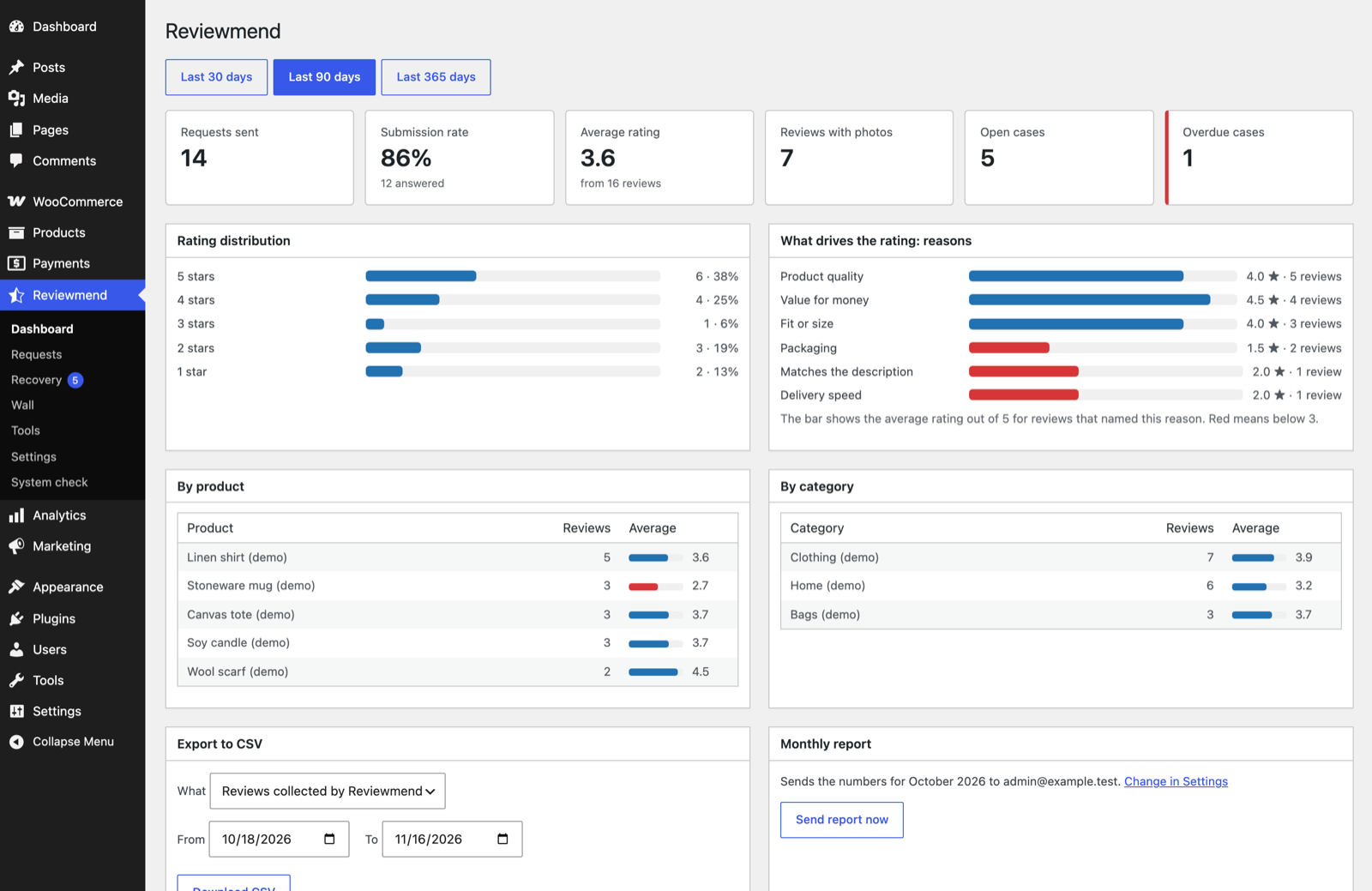
Choose Last 30 days, Last 90 days or Last 365 days at the top.
| Block | What it shows |
|---|---|
| Requests sent | Review requests sent in the period. |
| Submission rate | Share of those requests that were answered. |
| Average rating | Average of the product reviews collected through Reviewmend, with the number of reviews. |
| Reviews with photos | How many of those reviews have photos. |
| Open cases / Overdue cases | Recovery cases right now. |
| Rating distribution | Count and share of 5, 4, 3, 2 and 1 star reviews. |
| What drives the rating: reasons | The average rating of reviews that named each main reason. Red means below 3. |
| By product / By category | Number of reviews and average rating per product and per category (top 10). |
Ratings, photos and reasons count product reviews written through Reviewmend requests, pending and approved. Imported reviews and reviews written directly on the product page are not counted.
02Export to CSV
In the Export to CSV box choose What, a From and To date (shop time; default the last 30 days) and press Download CSV. Files are UTF-8 with a BOM, comma-separated, so Excel and Google Sheets open them correctly.
| What | Columns |
|---|---|
| Reviews collected by Reviewmend | Review, Date, Product ID, Product, Rating, Reason, Review text, Author, E-mail, Photos, Status, Order |
| Recovery cases | Case, Opened, Source, Order, Customer, E-mail, Products, Lowest rating, Reason, Status, Priority, Owner, Due, Resolved |
| Review requests | Request, Order, E-mail, Status, Scheduled, Sent, Reminded, Submitted, Order rating, Note |
The file name is, for example, reviewmend-reviews-2026-10-18-2026-11-16.csv. The Recovery cases export needs the recovery desk capability. Cells that start with =, +, - or @ get a leading apostrophe so spreadsheet programs do not run them as formulas.
Exports contain customer names and e-mail addresses. Store them safely and delete them when you no longer need them.
03The monthly report
On the first day of each month at 08:00 shop time, Reviewmend e-mails a summary of the previous month to the recipients in Settings (the site admin address if empty).
- Review requests sent, submission rate, product reviews, average rating, reviews with photos.
- Recovery cases opened and resolved in the month, open and overdue cases today.
- "What drove the rating": the top five reasons with their average rating.
- An Open the Reviewmend dashboard button.
If no request went out, the report says so and points to the System check. To send it immediately, press Send report now in the Monthly report box on the dashboard; it sends last month's numbers to the same recipients.
Switch it off in Settings → Reports, or switch off the Reviewmend monthly report e-mail in WooCommerce → Settings → Emails.